AR Character: Viral Fun Filter
- 3.4
- Rating
- 500.00K
- Installs
- Free
- Price

 Analysis by App-foxy
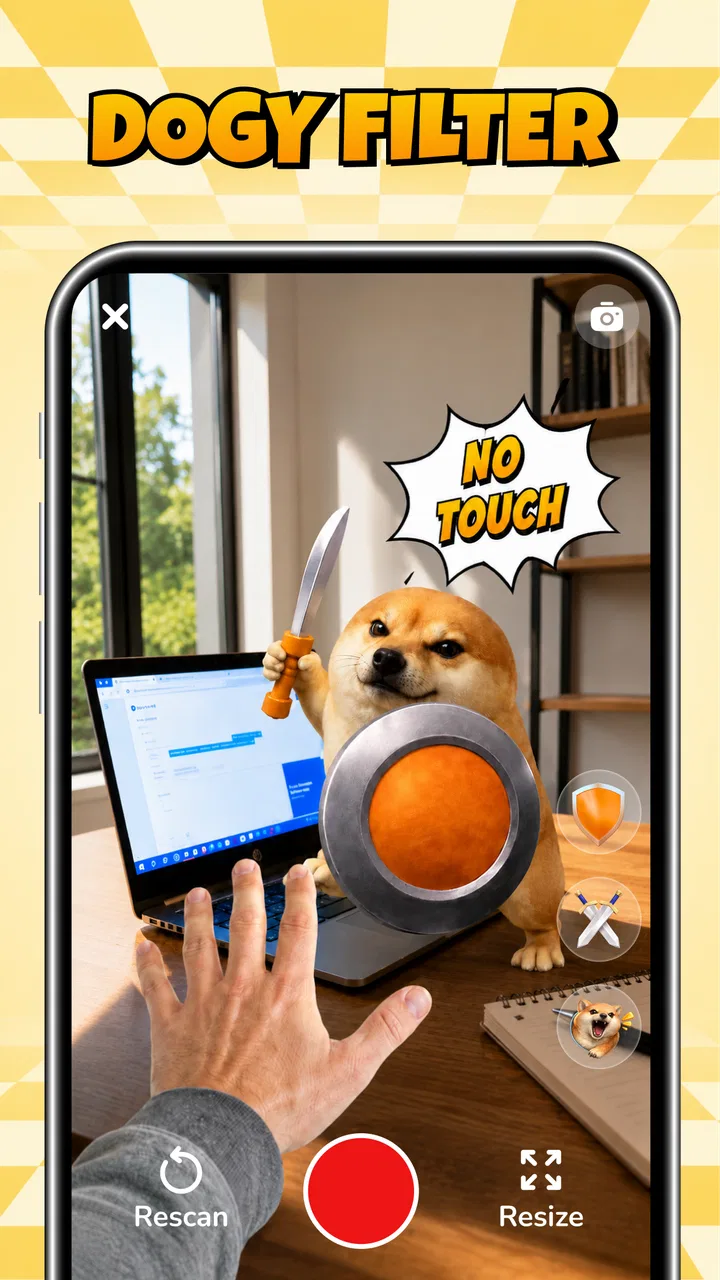
AR Character: Viral Fun Filter is the kind of entertainment app I open when I want a quick laugh rather than a full creative project. It turns the camera into a playful space for making short clips with an augmented-reality dog character, and the main appeal is immediate: point the phone, try the effect, record a reaction, and send it to someone. I can understand why it has attracted over 500 thousand installs, but I also think its lasting value depends heavily on how often you actually share this type of joke with friends.
My first impression is that this is not trying to replace a complete video editor or become a serious social network. It is a focused entertainment app built around a character filter. That narrow purpose is both its strength and its limitation. I do not have to learn a complicated timeline or spend time arranging clips, yet I also should not expect the creative depth of a dedicated camera studio. The developer, Piontech Studio, has kept the idea easy to understand: the fun comes from the AR character and the reaction around it.
How the novelty feels during the first week
During the first few uses, the app works best as a spontaneous activity. I can imagine opening it while sitting with friends, aiming the camera at someone, and recording a deliberately silly moment before the joke becomes overplanned. That low commitment matters. Many creative apps ask me to choose a template, adjust several controls, or learn a set of editing gestures before I can make anything worth sharing. Here, the attraction is the short path between opening the app and seeing the dog filter in action.
You May Also Like

 Google Keep - Notes and lists
Google Keep’s Quiet Growth Shows the Appeal of Simpler Notes
As mobile work gets busier, Google Keep keeps winning a simple contest: capture a thought quickly, find it later, and get on with the day.

 Blood Strike: 2.5 Anniversary
Blood Strike’s Loadouts Turn Every Drop Into a Tactical Gamble
A close look at Blood Strike’s custom loadouts: how fast access to signature weapons reshapes its battle royale rhythm, rewards preparation, and narrows the gap between fights.

 Pandora - Music & Podcasts
Pandora’s Music Is Easy to Start, but Harder to Recover
Pandora’s strength is its low-effort path from a seed to a station. Its weak spot is how much confidence it asks you to place in connection, setup, and quiet recovery.

 8 Ball Pool
8 Ball Pool Is Built on Rivalries, Rematches, and Routine
A close look at the rivalries, rematches, shared routines, and unanswered safety questions that turn a quick pool match into a persistent mobile community.

 Samsung Music
Samsung Music’s Quiet Strength Is Playing What You Already Own
Its reach comes less from spectacle than from dependable access to a personal library. That simplicity is both the app’s strongest retention engine and its ceiling.

 AccuWeather: Weather Radar
AccuWeather Review: A Quick, Clear Forecast for Everyday Decisions
For everyday plans, the best forecast is the one you can understand quickly. AccuWeather makes rain timing, radar, and local conditions easy to act on, with a few trade-offs.
More From Our News Desk



The most useful way to approach it is to treat the first session as experimentation rather than production. I would try the effect in different lighting, move the phone slowly, and test both a close-up and a wider view. Those small changes can make the character feel more connected to the scene and help me discover which framing creates the funniest result. The app’s store summary focuses on viral videos and pranks, but the better clips are usually the ones that fit a real moment instead of looking like a forced imitation of a trend.
A realistic everyday scenario would be a group chat conversation that has gone quiet. I could record a brief dog-filter reaction to an inside joke, send it privately, and move on. That is where the app feels more natural than a full video editor: the point is not to create a polished production, but to add a visual punchline to something already happening. It can also work for a quick birthday greeting, a playful response to a friend, or a short clip made during a casual break.
I would not recommend starting with the goal of producing a perfect viral post. That expectation puts too much pressure on a tool designed for quick amusement. The filter is more enjoyable when I accept that many recordings will be disposable. I may keep one clip, send another, and delete several others after testing the angle. The low stakes are part of the experience, and they make the app approachable for people who do not normally edit video.
The age rating of Everyone also makes the concept broadly accessible. In practice, that does not mean every prank is automatically appropriate for every audience. I still need to think about consent before recording another person, especially if the clip is going beyond a private chat. The safest use is to make the joke with people who understand the context and are comfortable being filmed. That is not a special technical feature, but it is an important part of using a prank-oriented camera app responsibly.
What makes the first sessions enjoyable
The strongest early quality is immediacy. I do not need a long explanation to understand what I am supposed to do, and the dog character gives the camera a clear purpose. That focus can be refreshing compared with entertainment apps crowded with feeds, menus, and unrelated tools. If I want a quick visual gag, the app gets me there without turning the moment into a project.
Another advantage is that the result can be judged while the situation is still happening. I can see whether the framing is funny before committing to a final clip, then adjust the phone or ask the person in front of the camera to try again. This encourages small, playful iterations. A useful trick is to record the reaction rather than only the filter itself: the person laughing, looking surprised, or pretending to be annoyed often gives the clip more personality than the AR character alone.
That approach also reveals the first trade-off. The app can start a joke, but it cannot supply chemistry between people. If the group is not in the mood, the same filter may feel repetitive. I get more from it when I use it as an ingredient in a social moment rather than expecting the effect to carry the entire video.
Whether it earns a place after the first month
The harder question is what happens after the initial curiosity fades. A filter can be entertaining several times in one afternoon and then become familiar very quickly. In my view, AR Character: Viral Fun Filter has recurring value mainly for people who regularly exchange short videos with friends. If my group chat enjoys visual jokes, the app can remain a handy occasional tool. If I rarely record or share clips, I may run out of reasons to open it fairly soon.
This is where it differs from broader alternatives in the entertainment category. A social video platform offers an endless stream of new material, while a full camera editor gives me more control over music, cuts, text, and pacing. The AR dog app offers neither of those larger ecosystems. Its advantage is speed and a recognizable gimmick; its weakness is that the experience depends on one central idea. I would choose it for a quick character-based joke, but I would choose a general editor when I already have a specific story to tell.
The same comparison applies to novelty-focused camera filters. A larger filter collection can give me more variety from day to day, but it may also bury the effect I actually want under menus and recommendations. This app’s narrow identity makes it easier to remember. The question is whether that simplicity feels convenient or limited. For me, it is convenient when I have a clear use for the dog character and limited when I want to build a different visual style.
One non-obvious way to extend its useful life is to assign it a particular role instead of opening it randomly. I might use it only for reaction clips, private jokes, or short greetings. That self-imposed boundary helps prevent the filter from becoming background noise. When every recording uses the same effect, the joke loses impact; when I save it for moments where the character adds something, it stays more recognizable.
I also find that the app is better suited to occasional bursts than daily creation. A daily habit would require a steady supply of situations that genuinely benefit from the filter, and most people do not have that. Its recurring value is therefore social rather than routine. It earns space when friends respond to what I make, not simply because the icon is sitting on my phone.
The maintenance question
For a lightweight entertainment app, maintenance is less about organizing a large library and more about deciding whether the shortcut remains worth keeping. The current version is 1.0.6, and the app is free, which lowers the cost of leaving it installed for occasional use. I do not feel the same pressure to justify storage or spending that I would with a paid creative tool. Still, a free app can create clutter if I never return to it.
My practical routine would be simple: keep it during periods when I am actively making playful clips, then remove it if several weeks pass without a real use. That is especially sensible for a single-purpose filter app. I would also avoid recording every attempt as though it were valuable footage. Short test clips can accumulate quickly, so reviewing and deleting the misses keeps the camera roll manageable and makes the successful clips easier to find.
Another maintenance habit is to check the framing before a social recording. I would first make a private test, look at how the character sits in the shot, and only then record the version I might share. This saves time and reduces the chance of making someone repeat a joke because the subject was partly out of frame. It also makes the experience feel less intrusive for the person being filmed.
The minimum operating requirement is Android 9, so compatibility is not aimed at the very oldest Android phones. For someone using a supported device, the more important practical question is whether the phone handles camera-based effects comfortably. I would test it before planning a group activity, because a novelty app is much less fun when the device struggles or the camera experience feels awkward. I would not make it the centerpiece of an event without trying it beforehand.
The app’s free status makes experimentation easy, but it does not remove the need for sensible sharing habits. I would keep private clips private unless everyone shown in them agrees to broader sharing. A prank can be funny inside a conversation and uncomfortable when posted publicly. The app encourages quick recording, so I need to supply the pause that asks whether the finished clip is actually welcome.
Where repetition starts to wear thin
The main source of fatigue is predictable: the central character remains the central character. At first, that consistency gives the app its identity. Later, it can make different recordings feel like variations of the same joke. The effect may still produce a laugh, but the surprise becomes dependent on the situation, the person reacting, and the timing rather than on the filter itself.
That is why I would skip it if I am looking for a complete content-creation workflow. The app is not the right choice for someone who wants detailed control over a finished video, a broad set of visual styles, or an ongoing library of creative tools. A conventional editor is better when I need to trim carefully, combine several scenes, add a deliberate structure, or create something that needs to communicate information rather than simply amuse.
I would also skip it if I dislike filming myself or other people. The filter does not remove the social awkwardness of recording. It may soften it by making the result silly, but I still need a willing subject and a situation where a camera feels appropriate. People who prefer watching content rather than making it will probably get more lasting value from a video platform or streaming service.
There is a subtler limitation in using a prank format: the humor can become one-sided. A clip made at someone else’s expense may get an immediate reaction from the person holding the phone while making the subject uncomfortable. I get better long-term use when the person in the frame is part of the joke, not merely the target. That distinction keeps the app from turning a quick laugh into a damaged friendship.
Another fatigue point is the difference between private and public sharing. In a private message, a rough clip can feel warm and spontaneous. On a public feed, the same clip may seem underdeveloped beside carefully edited videos. I would therefore use the app mainly for direct sharing or small groups unless the moment itself is unusually strong. This is a practical trade-off: speed is its advantage, but speed also means the result may not have the polish expected in a public showcase.
The average rating is 3.4 from around 226 ratings, which suggests a mixed reception rather than universal enthusiasm. I read that as a reminder to keep expectations realistic. People who enjoy the specific AR dog concept may find it immediately entertaining, while people expecting a broad creative toolkit may judge it more harshly. The app is easier to appreciate when I evaluate it as a focused joke-making camera instead of a complete video platform.
Who will keep using it
I think it suits friends who already communicate through short clips, parents looking for a simple playful activity with children, and casual creators who want a fast way to add a character to a reaction. It may also appeal to someone who is intimidated by editing software but still wants to make a funny video without learning a complicated interface.
The best long-term users will probably be selective. They will not force the filter into every conversation. Instead, they will wait for a moment where the dog character changes the tone: a mock-serious response, an exaggerated reaction, or a deliberately absurd greeting. That restraint preserves the surprise and reduces the sense that every clip is identical.
People who need professional presentation, detailed privacy controls, extensive editing, or a constantly changing catalog should look elsewhere. A broader camera app or editor will offer more room to grow. That does not make this app poor; it means its value is concentrated in a small, clearly defined kind of fun.
My long-term verdict
After the novelty settles, AR Character: Viral Fun Filter earns a place as an occasional social tool rather than a permanent daily habit. I like the directness: the concept is easy to understand, the app is free, and the dog character gives a basic recording a clear comic angle. For a quick message to friends, it can be more convenient than opening a full editor and building a video from scratch.
Its lasting weakness is also clear. The experience is built around one recognizable AR idea, so repetition arrives faster than it would in an app with a broad creative system. The filter cannot create a funny situation by itself, and it cannot replace good timing or mutual consent. If I expect an endless supply of fresh entertainment, I will probably be disappointed.
My recommendation is to try it when I want a lightweight way to make playful clips, especially if my friends enjoy responding with videos of their own. I would keep the recordings short, test the framing before involving others, and use the effect selectively instead of treating it as a daily challenge. The app is most worthwhile when it adds a quick visual punchline to a real social moment.
For someone deciding whether to install it, the answer depends on the intended use. If the goal is a simple AR dog filter for occasional jokes, this focused entertainment app is easy to justify. If the goal is a long-term creative workspace, a polished public-video tool, or a large collection of effects, a fuller alternative will be the better investment of attention. In my experience, the app does not need to become a permanent habit to be useful; it just needs to be ready for the right silly moment.
Piontech Studio has chosen a narrow concept, and that narrowness should guide expectations. I would recommend AR Character: Viral Fun Filter to casual social creators who value speed over control, while warning them that its charm depends on timing and moderation. It is a fun pocket tool, not an all-purpose camera. That distinction is exactly why I can enjoy it without pretending it offers more lasting depth than it really does.
FAQs for AR Character: Viral Fun Filter
01What is AR Character: Viral Fun Filter, and what can I do with it?
AR Character: Viral Fun Filter is a camera-based entertainment app designed to transform selfies and short videos with animated characters, augmented-reality effects, and viral-style filters. After granting camera access, you can preview effects in real time, capture photos or clips, and usually save or share the results. The available characters and filter styles may vary between app versions or special events.
02Does AR Character: Viral Fun Filter require a powerful phone or an internet connection?
The app should work on many recent Android and iOS devices, but augmented-reality effects can be demanding. Older phones may show slower tracking, reduced image quality, or limited access to certain filters. An internet connection may be needed to download the application, load new character packs, display advertisements, or use sharing features. Performance is generally better with updated software, sufficient storage, and good lighting.
03What permissions does the app request, and should I be concerned about privacy?
Because the app uses augmented reality, it may request access to your camera and, depending on its features, your microphone, photos, or media library. These permissions are needed to record content and save creations, but you can review or disable them in your device settings. Before using the app, check its current privacy policy to understand how images, videos, analytics, and other data are handled.
04Is AR Character: Viral Fun Filter free to download and use?
The app may be available as a free download, but free access can include advertisements, optional purchases, subscriptions, or locked character and filter collections. Some effects may be available immediately, while others could require watching an ad or upgrading. I recommend checking the store listing for the current pricing, trial terms, renewal conditions, and cancellation instructions before confirming any purchase.
05Can I save and share the photos or videos created with the app?
After applying a character or filter, the app generally lets you capture the result and save it to your device or share it through supported social networks and messaging services. Export options can depend on the device, operating-system permissions, and the selected effect. Remember that content featuring other people should be shared responsibly, and avoid publishing private images without the necessary consent.
Pros
- Turns selfies into playful augmented-reality character transformations.
- Quick camera effects are easy to apply and share with friends.
- Offers entertaining filters for short videos and social posts.
- Simple interface makes experimenting with effects straightforward.
- Can provide creative inspiration for photos
- reels
- and profile content.
Cons
- Some effects may look less convincing under poor lighting.
- AR tracking can lose accuracy with fast movement or covered faces.
- The most appealing filters may require in-app purchases or ads.
- Heavy camera effects can increase battery and device heat.
- Privacy-conscious users may dislike granting camera and media access.

AR Character: Viral Fun Filter
Gallery